- Published on
Data Visualization #1: Brno public transportation
- Authors

- Name
- Rob
- @x
Prompt: Grok3
This time, a single prompt wasn't enough for a working result. However, the entire experiment was purely language model driven, with no manual code editing. The data shown is unverified. The aim was only to create a purely visual experience, not an accurate simulation of Brno's public transport.
Input data
IDS JMK GTFS / GTFS timetable data
The input data consists of two simple text files.
Input data snippets:
stops.txt
| stop_id | stop_name | stop_lat | stop_lon | zone_id | location_type | parent_station |
|---|---|---|---|---|---|---|
| U15775Z2 | Hevlín, škola | 48.751285 | 16.380187 | "570" | 0 | U15775N1 |
| U15773Z2 | Hevlín, cihelna | 48.761387 | 16.38346 | "570" | 0 | U15773N2 |
| U15627Z2 | Hrabětice | 48.796862 | 16.395222 | "560" | 0 | U15627N3 |
| U15640Z2 | Šanov, u mostu | 48.799235 | 16.386832 | "560" | 0 | U15640N4 |
| U15639Z2 | Šanov, požární zbrojnice | 48.802143 | 16.373927 | "560" | 0 | U15639N5 |
stop_times.txt
| trip_id | arrival_time | departure_time | stop_id | stop_sequence | pickup_type | drop_off_type |
|---|---|---|---|---|---|---|
| 1 | 4:32:00 | 4:32:00 | U15775Z2 | 1 | 0 | 0 |
| 1 | 4:34:00 | 4:34:00 | U15773Z2 | 2 | 3 | 3 |
| 1 | 4:39:00 | 4:39:00 | U15627Z2 | 3 | 0 | 0 |
| 1 | 4:41:00 | 4:41:00 | U15640Z2 | 4 | 0 | 0 |
| 1 | 4:43:00 | 4:43:00 | U15639Z2 | 5 | 0 | 0 |
The simulation input is limited to these files. Therefore, many other parameters, such as the day of the week, are not considered.
Output:
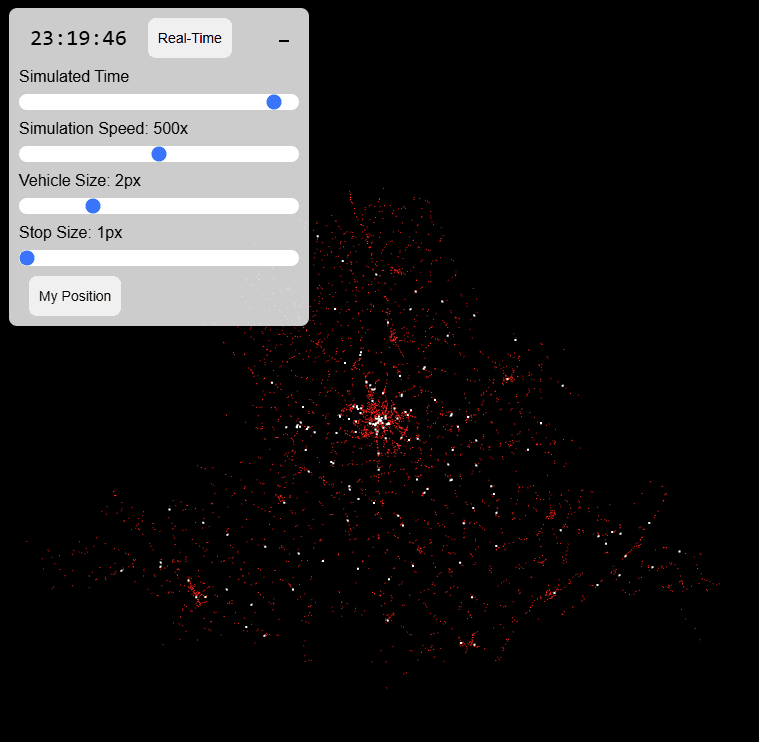
Controlling the Simulation
You can adjust the simulation with these parameters:
Parameters:
- Simulation Time: 0-24 hours
- Simulation Speed: 1x-1000x
- Vehicle Size: 1-5 px
- Stop Size: 1-5 px
Optional features:
- Real-Time button: Enabling the "Real-Time" option in the animation solely configures the current time and simulation speed to 1x. This should not be confused with the processing of real-time data feeds from the internet.
- My Position button: Displays a crosshair indicating your position